
CCBot - 24x Development Efficiency Boost

Table of Contents

Background
I’m a programmer with over a decade of experience. I’ve always preferred writing code by hand and looked down on AI-generated code. But in 2026, this mindset completely changed. It’s like the difference between cold weapons and firearms - the productivity is on a completely different level.
Productivity is the First Priority
Back when I worked at big tech companies, my direct manager often talked about improving productivity to make the business model work. To be honest, it always felt a bit abstract. But now I deeply understand what it means that productivity is the first priority.
OpenClaw vs CCBot
You might be familiar with OpenClaw - it lets you control your computer via phone, with operations handled by large language models. There’s been a recent wave of “shrimp farming” enthusiasm. As a programmer, I installed and tried it immediately. My conclusion: it’s not quite suitable for me.
Because I’m used to developing with Claude Code + Opus 4.6, this programming powerhouse. Other scenarios like reading emails, summarizing news, etc., I don’t really care about. And using OpenClaw to operate Claude Code feels awkward, or perhaps overkill, compared to OpenClaw’s complex installation and grander design.
So I developed CCBot, also built with Claude Code + Opus 4.6. The prototype took about 1 hour. The logic is very simple: control Claude Code on your computer through an IM bot. Currently works with Feishu (Lark) bot.
The workflow is roughly:
- Create a Feishu bot
- Install CCBot
- Start CCBot
- Control Claude Code on your computer via the Feishu bot
- Support running one CCBot per code project
CCBot 24x Efficiency Boost
This is a real scenario from tonight. I needed to modify 3 projects:
- Project 1: Modify the footer of my personal website vincentqiao.com to add the CCBot project
- Project 2: Add Bing API to the daily data report project to automatically scrape Bing data
- Project 3: Fix CCBot’s insufficient logging and robustness issues
Then I just told the 3 project bots in Feishu what needed to be done. The time was 21:19:

About 4 minutes later, I received feedback from the 3 bots one after another. All 3 tasks were completed. The time was 21:23:



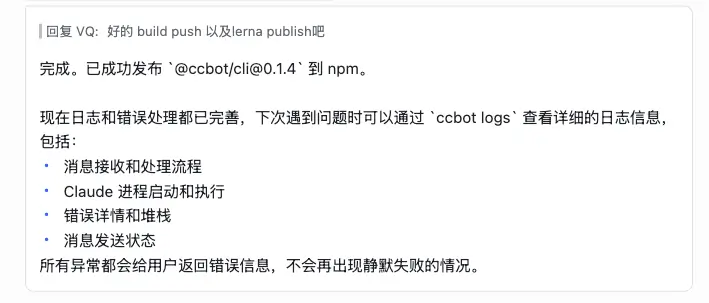
Looking back, let’s estimate how long these three tasks would have taken before:
- First, you’d definitely need to be at your computer, not just chatting in IM on your phone
- Project 1: Modifying the footer is relatively simple, including modification, build, and deployment, estimated 5 minutes
- Project 2: Adding comprehensive logging and error handling to CCBot, quite a bit of work, estimated 30 minutes
- Project 3: Calling Bing API to collect data. Since I hadn’t used Bing API before, from searching documentation to writing a local demo to final integration into the project, estimated 60 minutes
- And these three tasks cannot be done in parallel, total time 95 minutes, and that’s without any interruptions
Using CCBot: 4 minutes Traditional programming: 95 minutes Efficiency increased by 24x!
Even More
The above is just 3 projects in parallel. If you have multiple projects running in parallel, it’s not just 24x - it will be an even more impressive number:

The New Era
From a personal perspective, what does it mean if others are 24x faster than you? From a company perspective, what does it mean if other companies are 24x faster than you? In this new era, it’s truly the difference between cold weapons and firearms~
Related Articles
Shocking! This Tool Lets Programmers Finish 95 Minutes of Work in 4 Minutes! 24x Efficiency Boost
Lying in bed, sent 3 messages, completed 3 projects in 4 minutes. Traditional method takes 95 minutes. This is the difference between cold weapons and firearms.
Claude Code Agent Loop: Dissecting the Heart of an AI Coding Assistant
How does Claude Code understand your requests, invoke tools, and self-recover step by step? A source-code deep dive into the Agent Loop's core architecture — streaming responses, parallel tool execution, auto-compaction, and error recovery.
Claude Code settings.json Explained (1): Where Config Files Live and Who Wins
A complete guide to Claude Code's configuration file system — five config sources, their file paths, priority rules, array merging vs value overriding, and enterprise managed settings delivery.
Claude Code settings.json Deep Dive (Part 2): The Permissions System
A thorough breakdown of Claude Code's permissions configuration — allow/deny/ask rule arrays, wildcard syntax, MCP tool permissions, defaultMode options, and additionalDirectories.
Claude Code settings.json Deep Dive (Part 3): The Hooks System
A thorough breakdown of Claude Code's hooks configuration — four hook types, core events (PreToolUse/PostToolUse/Stop/Notification), stdin/stdout protocol, exit code semantics, and practical examples.